Professional ID Card Template for Canva: A Complete Branding Solution
Every business, from startups to established agencies, understands the importance of a polished, professional image. One often-overlooked detail that speaks volumes about a company's attention to detail is the employee or member ID card. A well-designed ID card isn't just a security measure—it's a tangible piece of your brand identity that employees carry daily, clients notice, and partners recognize. Yet, many organizations settle for generic, uninspired designs because creating custom cards from scratch feels time-consuming and expensive. That's where a thoughtfully crafted digital template changes everything.
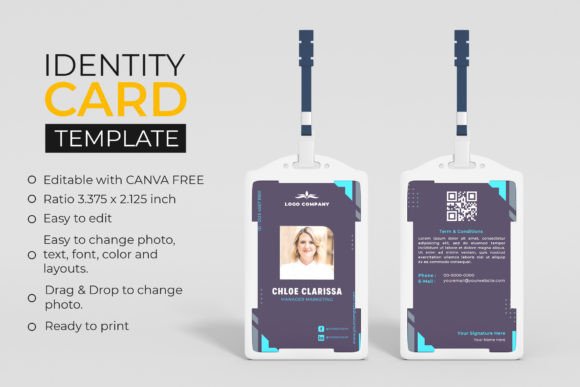
The ID Card Professional Canva Template offers a ready-to-use solution designed specifically for corporate offices, agencies, and companies that want consistency without the hassle. This isn't a rigid, one-size-fits-all file. It's a fully editable design built in Canva's intuitive platform, meaning anyone with a free Canva account can open it, make changes, and have print-ready cards in minutes. The template includes both front and back sides, giving you space for all the essential information—name, title, photo, company logo, barcode, emergency contacts, and more—while maintaining a clean, modern aesthetic.
Why a Dual-Sided ID Card Design Matters
Think about the last time you looked at a professional ID card. The front typically displays the most critical visual elements: a headshot, the person's name, their role, and the company branding. The back often holds secondary but equally important details—access instructions, safety protocols, QR codes, or organizational information. Having a template that accounts for both sides from the start eliminates the guesswork. You're not scrambling to create a second layout or wondering how to balance the visual weight between front and back.
This particular template is sized at 2.125 by 3.375 inches, which is the standard ID card dimension used by most badge holders and lanyard sleeves. That means no resizing headaches, no awkward cropping at the print shop, and no surprises when the final product arrives. The design is ready to print the moment you finish customizing it, saving you the back-and-forth that usually accompanies professional print jobs.
Customization That Actually Feels Custom
One of the biggest frustrations with pre-made design assets is the feeling of being boxed in. You download something that looks great in the preview, but when you try to adapt it to your brand, you hit walls—locked layers, rasterized text, or color options that don't match your palette. This Canva template takes a different approach. Every element is fully editable: colors, fonts, text, photos, and even the layout structure.
Want to swap the background color from navy to your company's signature teal? A few clicks. Need to change the font from a clean sans serif to something with more personality? Just highlight and replace. Have a team photo ready to drop in? The drag-and-drop photo replacement feature makes it seamless. You're not learning a complex design program or paying for expensive software. You're working in Canva—a tool millions of people already know and trust for everything from social media graphics to presentation decks.
This flexibility is especially valuable for small business owners and entrepreneurs who wear multiple hats. You might not have a dedicated design team, but you still need your brand to look cohesive and professional across every touchpoint. A customizable template bridges that gap, giving you the structure of a professionally designed layout while leaving room for your unique brand personality.
Building Brand Consistency Across Every Detail
Brand identity isn't just about your logo or website. It's the sum of every visual interaction someone has with your company—the business cards, the email signatures, the packaging, the social media posts, and yes, the ID cards your team wears. When all of these elements share the same color palette, typography style, and design language, something powerful happens: people start recognizing and trusting your brand faster.
Using a template that lets you apply your exact brand colors and fonts ensures that your ID cards don't feel like an afterthought. They become a natural extension of your visual identity. If your marketing materials use a modern sans serif font paired with a specific shade of blue, your ID cards should reflect that same aesthetic. It's a small detail, but consistency at this level signals professionalism and reliability to clients, vendors, and potential partners.
For agencies managing multiple client brands, the ability to quickly swap out colors and fonts is a game-changer. Instead of designing cards from scratch each time, you can duplicate the template, apply a new client's brand guidelines, and deliver a polished product in a fraction of the time. It's efficient, scalable, and keeps your output looking consistently high-quality.
Practical Applications Beyond the Corporate Office
While the primary use case is corporate and agency ID cards, the versatility of a well-structured template extends further than you might expect. Event organizers can adapt it for conference badges. Educational institutions can use it for faculty and student IDs. Co-working spaces can create member cards. Nonprofits can design volunteer identification. Even creative freelancers can use it to make professional-looking badges for workshops, pop-up events, or trade shows.
The key is that the template provides a solid foundation—proper dimensions, balanced layout, logical information hierarchy—that you can build on for any context where identification and branding intersect. Because it's digital and instantly downloadable, you can start working on it right away. There's no waiting for shipping, no physical product to store, and no limitation on how many times you can edit and reuse it.
Getting the Most Out of Your Design
A few practical tips can help you maximize the impact of your ID cards. First, keep the front side focused. Resist the urge to cram every piece of information onto one surface. The front should be scannable at a glance—name, photo, title, and logo. Save the detailed content for the back. Second, choose fonts that prioritize readability over flair. A beautiful script font might look stunning on a wedding invitation, but on a small ID card viewed from arm's length, clarity wins every time.
Third, think about your photo quality. A professional headshot with even lighting and a neutral background will always look better than a casual snapshot. If your team works remotely, consider creating a simple photo guide so everyone submits images with consistent framing and background color. Finally, print a test batch before committing to a large run. Colors can shift between screens and printers, and seeing a physical sample helps you catch any issues before they become expensive mistakes.
For anyone managing a brand—whether you're a solo entrepreneur building your first company identity or a marketing professional overseeing a team of fifty—having reliable, editable design assets like this ID card template isn't just convenient. It's a smart investment in how your organization presents itself to the world. Professional, consistent, and effortlessly customizable, it turns a routine administrative task into an opportunity to reinforce your brand every single day.